Raid Bases
NPC raid bases spawn on the world and show on your in-game map (G). Difficulty and whether a raid is PVE or PVP are shown by icon and color. Hovering the map icon can show who has a PVE raid locked, and entering a PVP raid usually triggers an on-screen warning. For wipe timing and PVP day, see Wipe info and the in-game info panel.
Raid types on the map
Colors and labels follow roughly this scheme (exact wording may vary slightly in-game):
- Easy — PVE. Can spawn naturally on the map.
- Medium — PVE. Can spawn naturally on the map.
- Hard — PVE or PVP depending on the spawn. Check the map and warnings when you enter.
- Expert — PVE. Can spawn naturally on the map.
- Nightmare — Does not spawn naturally; you buy a personal locked raid with /buyraid (see below).
- Abandoned / Player — PVP. Former player bases turned into raid content (see Player raid bases).
- Admin event — PVP. Special server-run raids.
Not every tier is always spawning at once; availability can change through the wipe. Our site tiers above also note typical “day of wipe” behavior where it still applies:
- Easy and Medium — usually available all wipe.
- Hard — often from the 2nd day of the wipe onward when spawning naturally.
- Expert — often from the 3rd day onward when spawning naturally.
- Nightmare — /buyraid only, typically from the 3rd day onward.
PVE locks and PVP
- PVE raids lock to the first player to destroy part of the building or kill an NPC. While locked, hovering the map icon can show the raider’s name. Anyone not on that team is ejected from the raid area.
- PVP raids are free-for-all; normal PVP rules apply (see server rules and the in-game PVP tab in /info).
- If you walk away from a PVE raid for too long, it can unlock and go public again so someone else can lock it. You may still be on cooldown and unable to start another raid until that one finishes or despawns—don’t abandon a raid lightly.
Completing an NPC raid
Easy and Medium raids count as finished when you either destroy or access the Tool Cupboard or loot or open every storage box in the raid.
Hard, Expert, and Nightmare raids require you to find a specific amount of the loot (not only “touch the TC”)—the exact requirement is enforced in-game.
When a raid completes, a despawn timer starts (on the order of a few minutes). If you keep dealing explosive damage to raid building blocks, that timer can reset so your team can keep clearing without the base vanishing early.
Rewards for finishing an NPC raid are split among participants. You only count if you personally destroyed raid entities during that run—tagging along without hitting anything does not earn a share.
Zeds, cooldowns, and /buyraid
Starting (or buying) raids costs Zeds and puts your account on a cooldown before you can start the same tier again. Approximate values shown in the in-game info panel:
| Tier | Cost (Zeds) | Cooldown |
|---|---|---|
| Easy | 100 | 30 minutes |
| Medium | 250 | 1 hour |
| Hard | 500 | 2 hours |
| Expert | 1,500 | 4 hours |
| Nightmare | 5,000 | 8 hours |
Use /buyraid to purchase a personal locked raid (typically Nightmare-tier content) that only you and your team can run.
Leaderboards and chat title
View raid leaderboards with /rb ladder (current wipe) or /rb lifetime. Each wipe, the top raider from the previous wipe can get a custom chat title such as [Top Raider].
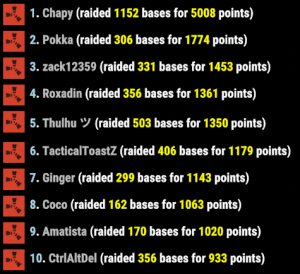
Player raid bases
Player raid content appears in two main ways: abandoned bases (you stopped playing) or converting a base you still own.
Abandoned player base
- If you fail to log in for too long, your base can become a raid base and your character may be removed for server performance.
- Approximate absence thresholds: default 3 days, VIP 4 days, Veteran 5 days. You must be online more than about 5 minutes in a session for that login to count as activity.
- An active clan base is fine as long as at least one clan member has been online within the window.
- Empty boxes get filled from raid loot tables; existing loot can remain.
- Abandoned raids are always PVP.
Converting your base
- You need a Runestone (from the /s store) and 200 Zeds (from quests, trivia, NPC raids, etc.).
- Use only one Tool Cupboard and no high external walls in the design you convert.
- No other TC or sleeping bag may be within 150 m in any direction of yours.
- Include multiple empty boxes so loot can spawn; more complex bases can roll more loot.
- Stand next to your TC, look at it, and run /ar raidme, then confirm through the warnings.
- Converted bases are always PVP and behave like other PVP raids. Neighboring bases outside the raid bubble are not converted.
- Anything deployed or built inside the bubble during the fight can be destroyed and will despawn when the raid ends.
- Backpacks drop if you take part in combat.
- After you leave the bubble, you can still be attacked for about 120 seconds.
- When every box has been opened or the TC is destroyed, the base despawns after about 5 minutes.
- A raid timer (often around 45 minutes by default) resets when a building piece is destroyed.
- There is a server cap on how many player raid bases can exist at once and a long cooldown—you are adding content for everyone, so put real effort into the build.
Command quick reference
- /rb ladder — leaderboard for the current wipe
- /rb lifetime — all-time style stats
- /buyraid — buy a personal locked raid (Zeds + cooldown)
- /ar raidme — convert your eligible base (look at your TC)
Open /info in-game and use the Raid Bases tab for the same write-up with paging.